How To Check CPU Temperature And Fix Overheating Problems

Whether you're using a laptop or a desktop, CPU cooling may often be a bit of an afterthought....

Gaming Laptop Vs. Handheld Console: Which Device Is Better For Gamers?

For years, buying a gaming laptop has been the only practical option for anyone seeking powerful performance in...

Reviving An Old Mac: Tips From An Expert To Bring Your Old Laptop Back To Life

I recently ran into a conundrum with my brother, who is embarking on the college journey and needs...

7 Best MSI Laptops For Students Ranked By Price

We may receive a commission on purchases made from links. As a tech enthusiast who went through a...

What Is A Chromebook Plus & How Does It Differ From A Regular Chromebook?

We may receive a commission on purchases made from links. Google developed the first Chromebooks in 2011 in...

What Does Ti Mean On An Nvidia GPU?

The components that affect the budgeting decision for a gaming PC are often the CPU, GPU, and RAM....

Why Are Students Pushing Pencil Lead Into Chromebooks?

New smartphones, PCs, and laptops are some of the priciest everyday purchases many of us will make. Couple...

CPU Over Temperature Error: What It Means And How To Fix It

The Central Processing Unit (CPU) is the heart of any computer, and like any powerful electronic component, it...

5 Of The Best Mac Apps For Productivity

With powerful internals, a nano-texture display, and a battery that lasts an entire day, the MacBook Pro M4...

How Cleaning Your Laptop Could Help Solve Its Overheating Issue

We may receive a commission on purchases made from links. To the average user, a laptop might not...

The 5 Big Reasons Apple’s MacBook Touch Bar Never Caught On

When Apple released its first MacBook Pro with a Touch Bar back in 2016, many saw it as...

Can You Check Your Laptop On A Plane? Here’s What TSA Has To Say

If you're traveling by airplane, it's always a good habit to check your chosen airline's bag policies before...

Why Are Some USB Ports Yellow? Here’s What It Means

If you've seen your fair share of laptop and desktop computers, you may have noticed that some USB...

What Is MSI Center (And Should You Uninstall It)?

A common habit for many computer hardware manufacturers is to include their proprietary software in their prefab towers...

How To Stop Screen Recording On A Chromebook

The ability to easily record your screen is one of the great Chromebook functions people may not be aware...

Can You Get A Virus On A Chromebook? Here’s What Google Says

There's a lot to like about Chromebooks. They're budget-friendly, making them one of the cheapest replacements for an...

MacBook Air Vs. MacBook Pro: Which Is Better For Your Laptop Needs?

The MacBook has always been iconic, but Apple's transition to its in-house M-series of chipsets has solidified its...

Is There A Raspberry Pi Laptop? Here’s What You Need To Know

While there's a wide array of complex and fancy projects you can make with a Raspberry Pi, one...

How To Remove Bloatware From Windows 11 (And Why You Should)

When you first set up a new Windows 11 PC, you may notice that it comes pre-installed with...

Why Your Laptop Is Taking So Long To Charge (And What You Can Do About It)

Laptops are useful, but they can be a pain to deal with when something goes wrong. Not only...
  • William
  • Blog

Apple’s 2025 Mac Studio Pairs New M3 Ultra With Thunderbolt 5 And A Memory Boost
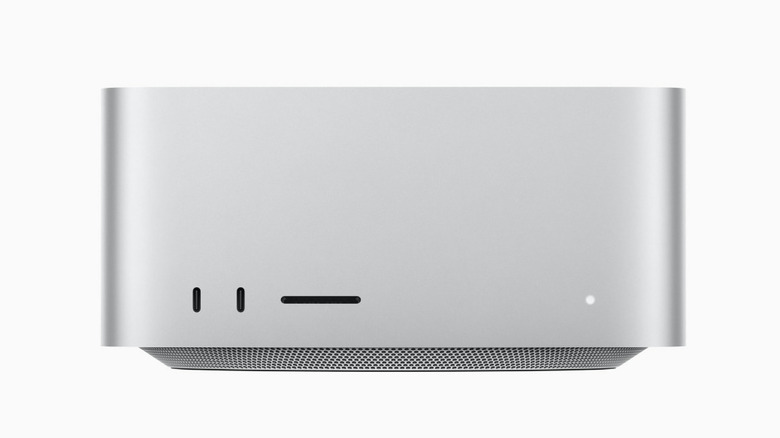
Apple has just announced the new Mac Studio pro desktop, after testing for the M3 Ultra chip started two years ago. It’s now being called the most powerful Mac ever made. Aimed at professionals working both at home and at studios, the new M3 Ultra chip provides a higher memory capacity, improved graphics, and advanced AI capabilities. Apple’s senior vice president of hardware engineering John Ternus called the desktop a “complete game-changer,” pointing out its 16TB of “superfast” storage and Thunderbolt 5 connectivity. 

In its official announcement of the Mac Studio, Apple stated that the M3 Ultra’s performance is “two times faster” than the M4 Max, thanks to many record-breaking specs. The M3 Ultra has up to a 32-core CPU with 24 performance cores, which is the most CPU cores to ever be in a Mac, and up to an 80-core GPU, which is more than any previous Apple Silicon chip. The M3 Ultra also has over 800GB per second of unified memory bandwidth — it starts with 96GB of unified memory and can be configured up to 512GB, the most unified memory on any personal computer ever. 

Another major performance upgrade that comes with the M3 Ultra is Thunderbolt 5. According to Apple, Thunderbolt 5 allows the Mac Studio to reach up to 120GB per second data transfer speeds, which is “more than double” of the Thunderbolt 4. This is yet another feature that makes the new Mac Studio focused on productivity for professionals, providing faster data transfer speeds for external storage, docking, and hub solutions. Each Thunderbolt 5 port has a custom-designed controller on the chip.

New M3 Ultra meant for AI functionality at highest specs
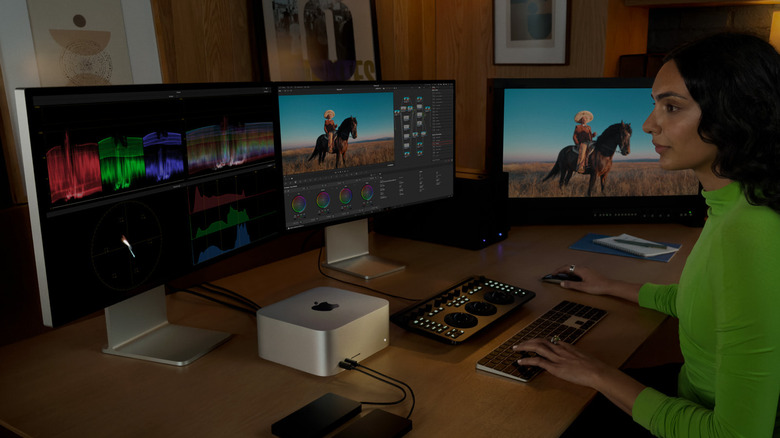
The record-breaking GPU and unified storage appears to be aimed at improving the new M3 Ultra’s AI functionality. Apple called the new Mac Studio a “powerhouse for AI,” able to run “large language models with over 600 billion parameters entirely in memory.” The computer was built with Apple Intelligence in mind, which provides professionals with writing tools, meeting transcriptions, tech support, and other useful features. Apple also highlighted the Mac Studio’s ChatGPT functionality, stating that professionals have it integrated into Writing Tools and Siri to be more productive at work. The AI-powered Image Playground that’s available on iPhones, was also mentioned, prompting Mac users to utilize this tool to stay efficient.

Mac Studio is coming out on March 12, but can be pre-ordered starting today. Mac Studios start at $1,999, but your specific configurations can increase the cost — the M3 Ultra chip boosts that price up to $3,999. Increasing the M3 Ultra’s GPU and storage costs another $1,500, the max unified memory of 512GB is a whopping $4,000 extra, and the aforementioned 16TB SSD storage is another $4,600. When maxed out, the Mac Studio is over $14,000. 


Source: http://www.slashgear.com/1804432/2025-mac-studio-m3-ultra-thunderbolt-5-memory-specs-price-details/

Inline Feedbacks
View all comments
guest