What’s The Difference Between Desktop And Laptop GPUs?

Have you noticed that GPUs from top brands like Nvidia or AMD can be just as expensive as...

The 5 Big Reasons Apple’s MacBook Touch Bar Never Caught On

When Apple released its first MacBook Pro with a Touch Bar back in 2016, many saw it as...

Sleep Vs. Hibernate In Windows: What’s The Difference & Which Should You Use?

When stepping away from your Windows computer, you don't always need to shut it down. Windows also offers...

How To See What Graphics Card Is In Your PC

There are multiple components that make a computer, the most prominent of which include the CPU, GPU, RAM,...

How To Download The YouTube Web App On Your Mac

Browser bookmarks are an easy way to access websites that one visits frequently. YouTube is one of those...

How Cleaning Your Laptop Could Help Solve Its Overheating Issue

We may receive a commission on purchases made from links. To the average user, a laptop might not...

Can You Still Use A Laptop That Has A Broken Screen?

We may receive a commission on purchases made from links. While laptops from reliable brands like Dell and...

How To Find Your Favorite Photos On iPhone iOS 18

Since the release of iOS 18, there have been numerous features to help better organize and customize your...

How To Resize An Image On A Mac Or PC

When working with photos, resizing them is something you might need to do from time to time. This...

How To Speed Up Your Internet Connection On Windows

Having a fast and reliable internet connection is essential for almost everything you do on your Windows PC...

I Didn’t Expect This Dell Laptop To Beat My M3 MacBook—But It Surprised Me

I first burned my hands with an Arm-based computing system with the Surface Pro X back in 2019....

CPU Over Temperature Error: What It Means And How To Fix It

The Central Processing Unit (CPU) is the heart of any computer, and like any powerful electronic component, it...

How To Clear Your System Data On Mac

A sure-fire way to prevent your Mac from slowing down and avoid errors like "Your startup disk is...

How To Completely Uninstall McAfee From Your PC Or Mac

McAfee is a well-known antivirus software that provides comprehensive protection against malware, viruses, and other online threats. However,...

How To Boot Windows Directly From A USB Drive

Running Windows completely off of a USB flash drive is quite handy if you want to try a...

Can You Check Your Laptop On A Plane? Here’s What TSA Has To Say

If you're traveling by airplane, it's always a good habit to check your chosen airline's bag policies before...

5 Of The Best Mac Apps For Productivity

With powerful internals, a nano-texture display, and a battery that lasts an entire day, the MacBook Pro M4...

How To Roll Back NVIDIA Drivers (And Why You Might Want To)

Most of us know this scenario: GeForce gives you a pop-up that new NVIDIA drivers are ready to...

Microsoft Powertoys Explained: What Utilities Are Included & How To Install Them

Microsoft PowerToys is a set of tools that have been around since the days of Windows 95. They're made...

What Is A Chromebook Plus & How Does It Differ From A Regular Chromebook?

We may receive a commission on purchases made from links. Google developed the first Chromebooks in 2011 in...
  • William
  • Blog

New MacBook Air Wraps M4 Power In An Unexpected Color: Prices And Specs

Apple has introduced yet another new product for its “Air” line with the 2025 MacBook Air with M4, building upon the M3 iPad Air announcement yesterday. The latest offering follows the teaser published by Apple CEO Tim Cook on X (formerly Twitter) earlier this week, in which he promised that a new “Air” device would be revealed in coming days — though, it turns out, the company had at least three new products in the pipeline, plus a new base tier iPad sporting an A16 chip.

As anticipated, the new 2025 MacBook Air sports Apple’s blistering-fast M4 chip, the same one that first arrived on the market with the iPad Pro M4 released in 2024 — a model which, we noted in our review, has far more power than you’d need thanks to the limitations of iPadOS. Fortunately, the MacBook Air doesn’t share that same limitation, meaning users will enjoy the full capabilities offered by Apple’s best silicon chip paired with the baseline 16 GB of RAM, support for dual 6K external displays, and a 12 MP Center Stage camera.

Both laptops remain true to their name with less than a 0.5-inch thickness — and yes, both 13-inch and 15-inch sizes are on offer, each sporting a Liquid Retina display with support for 1 billion colors and up to 500 nits brightness. Other notable features include the presence of a 3.5mm audio jack, Wi-Fi 6E, Bluetooth 5.3, a three-mic array, and Spatial Audio and Dolby Atmos.

New color, more memory, and a familiar price tag
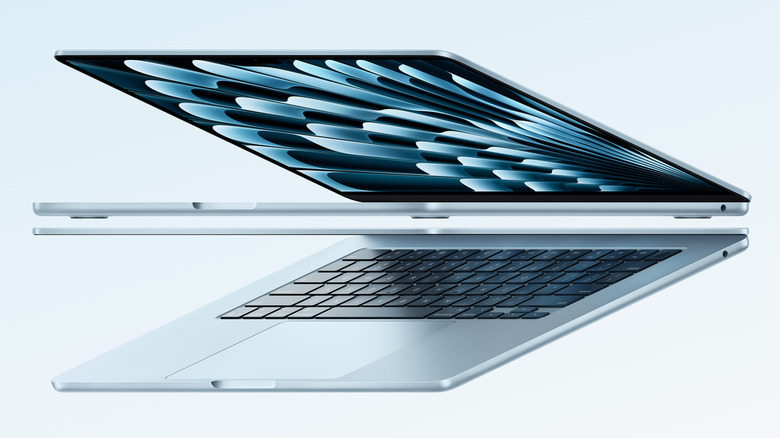
As we’ve previously detailed, the M4 chip represents a notable improvement over Apple’s M3 lineup, which was the chipset featured in the most recent version of the MacBook Air prior to the 2025 model’s launch today. The new hardware sports a 10-core CPU and up to a 10-core GPU, potentially resulting in a 23x performance boost when compared with the top-line Intel MacBook — though you may need to opt for the full 32 GB of RAM on offer to get the most out of it.

As expected, the new MacBook Air M4 also has extra-long battery life at up to 18 hours, and it’s packing a Neural Engine to power the Apple Intelligence features rolled out in Apple’s recent past. When compared with the M1 MacBook Air model, the company says AI task processing happens around 3x times faster. 

The 13-inch MacBook Air M4 will be available on March 12 (preorders live now) with a starting price of $999, while the 15-inch MacBook Air M4 will start at $1,119. Whereas the M3 MacBook Air was offered in four colors — silver, Space Grey, Starlight, and Midnight — the M4 models are available in Silver, Starlight, Midnight, and a new Sky Blue color that Apple describes as metallic with dynamic gradients.


Source: http://www.slashgear.com/1804322/new-macbook-air-m4-colors-price-specs/

Inline Feedbacks
View all comments
guest